
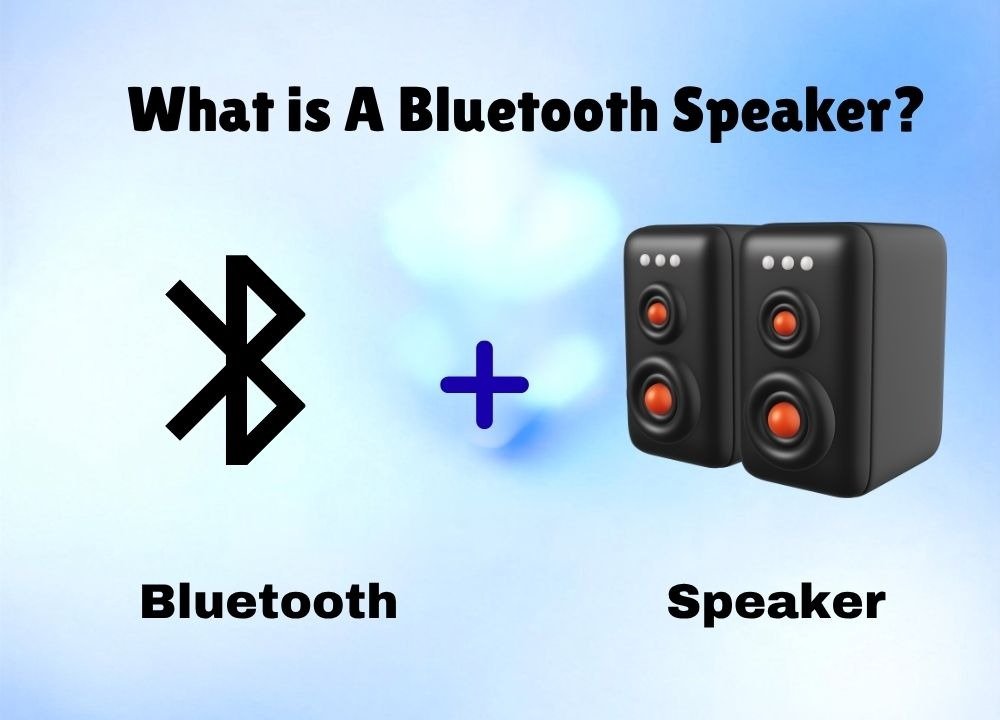
Have you ever wondered what the Bluetooth speaker you use actually is, how it works, and how it sends sound from your mobile or laptop directly to your ears?
Actually, there is a lot of detail behind this audio electronic device; you will even wonder when you listen to the interesting story behind the name “Bluetooth” itself. According to the Digital Chutney blog, it was named after King Harald Bluetooth, a 10th-century Scandinavian king who united disparate tribes; just like today, this technology connects different devices!
If you are here to learn about this wireless audio electronic device, you are definitely in the right place, because here you will discover exactly what a Bluetooth speaker is and how it works, what components it has, and what features and benefits it has.
As a tech enthusiast, I will also cover the latest 2026 Bluetooth speaker models, but the most fun part is understanding how sound waves travel through the air and how audio data gets compressed; once you do, your experience with this wireless audio device changes.
Your mind will start thinking at a pro level, and ultimately you will be able to choose the right audio codecs, such as aptX or AAC, for lag-free sound, remove signal interference, and even extend speaker life by balancing batteries and amplifiers.
What is a Bluetooth Speaker?
Definition
You may know the basic definition: a Bluetooth speaker is an audio device that plays sound through short-range radio waves, and the best part is that it doesn’t require wires to transfer sound to your ears. And that’s exactly what makes it a Bluetooth speaker. So, before you understand a Bluetooth speaker in detail, you need to know about Bluetooth technology.
Bluetooth Technology and Its Connection with Speaker
In 1990, two engineers at a Swedish company started experiments on short-range wireless communication. They eliminated the need for wires by using 2.4 GHz ultra-high-frequency waves. Here, I am not talking only about Bluetooth speaker technology; this concept can also let two devices share data. Because this technology works on 2.4 GHz radio frequency bands, it uses very little power, so your device’s battery doesn’t drain quickly.
What Does 2.4 GHz Mean?
2.4 GHz is actually the ultimate wireless engine behind every Bluetooth speaker. It is a high-speed wireless frequency (air path) that transmits data so fast your mobile can send audio data to your speaker in a hundredth of a second. This plays a crucial role in wireless audio transmission in a Bluetooth speaker; you can’t imagine a Bluetooth speaker without it.
You might think of a Bluetooth smart speaker as just a technology-based device, but think for a moment: have you seen the Bluetooth logo on your phone and laptop, and have you ever used Bluetooth to connect a DJ or a party speaker? Now maybe your mind has a clear idea like the following basic formula;
- Mobile Bluetooth + DJ speaker
- Laptop Bluetooth + Party speaker
- Mobile Bluetooth + another mobile Bluetooth
It is not limited to these devices; the rule is “Mutual Compatibility.” In other words, a speaker can connect to another device only when both have Bluetooth technology (hardware and software). When both devices have Bluetooth technology, they create a wireless digital bridge between each other. This lets sound or data transfer from one device to another without a wire.
Now here’s another thing: I can give the name “Bluetooth speaker” to a DJ speaker, a party speaker, and even any common speaker that has Bluetooth technology. It means the name “Bluetooth speaker is just a name that is used to refer to any speaker that can play sound through Bluetooth technology.
Do you know? We can also call earbuds a “Bluetooth speaker” because they use the same Bluetooth technology, but they differ in size and other features. The main difference is that a Bluetooth DJ speaker or party speaker is for public listening, while Bluetooth earbuds or headphones are for private listening.
The Connection of Bluetooth and Speaker That Make a “Bluetooth Speaker”
Now that we understand Bluetooth technology and the 2.4 GHz frequency, it’s time to look at the Bluetooth speaker as a whole. We can describe its connection in three main points;
1) Actually, Bluetooth’s main job is to transfer audio data from one device to another.
2) Bluetooth gives the speaker a unique address so your device (mobile or laptop) can connect securely to only that device.
3) Bluetooth ends where the speaker begins. Bluetooth carries data to the speaker’s doorstep, and the speaker captures that data and converts it into physical sound.
That’s it!! Now we understand this connection through an example;
“Bluetooth is the “postman” that brings the lyrics of the song from your mobile, and the speaker is the “human” who opens the lyrics and reads them out loud! Without this excellent connection, a wireless speaker would be impossible.”
Hardware Components of a Bluetooth Speaker and Their Role in Transferring Sound
Now here comes a most technical part. I am going to tell you all possible and universal hardware components of a Bluetooth speaker. Whether your Bluetooth speaker is portable, small, or big, like DJ speakers or party speakers, the following is a list of hardware components that play a big role in converting digital signals into sound without any wires.
Instead of a scattered list, I’ll group the hardware components so you can easily understand how a Bluetooth speaker works and which parts play a role.
Step 1: Powering a Bluetooth Speaker
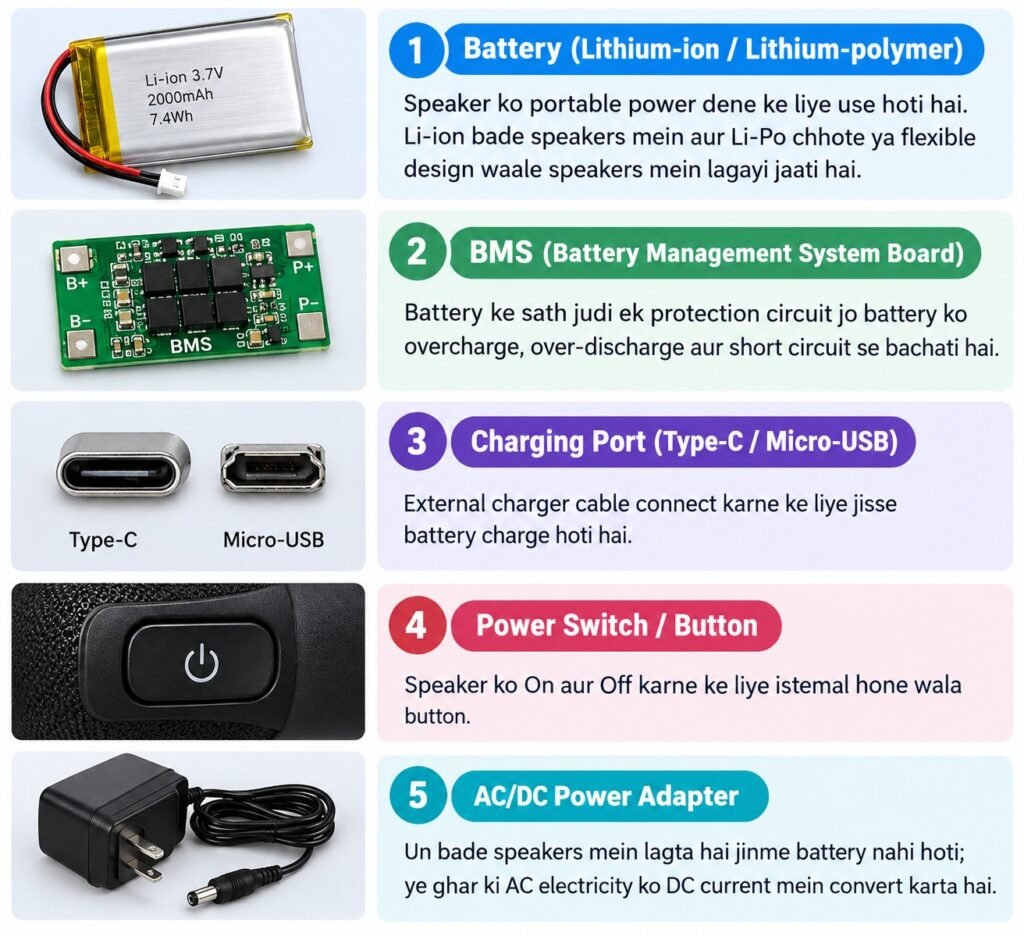
First, we need to power the Bluetooth speaker, which means connecting the electrical system to the speaker. Here’s what hardware components work to power on your Bluetooth speaker.
Battery
Bluetooth speakers may use two types of batteries: lithium-ion and lithium-polymer. This depends on the speaker’s size and use. Li-ion batteries are commonly used in medium- or big-sized Bluetooth speakers, where long battery life matters. On the other hand, Li-Po batteries are mostly used in small or flexible-shaped speakers.
BMS (Battery Management System
This is a small circuit that is attached to the battery. It does three most important jobs;
1: It prevents battery overcharging
2: It prevents the battery from overdischarging so it keeps working
3: If a short circuit occurs (wires are connected incorrectly), it immediately cuts off the current to prevent a fire or explosion.
AC/DC Power Adapter
It is almost only available in large speakers that do not include batteries. It converts wall AC electricity into DC, so the speaker circuit can use it.
Charging Port
The charging port may be Micro-USB (old models) or USB-C (new models with fast charging)
Power Switch
This is a simple button that turns on a Bluetooth speaker.
Step 2: Signal Input (Connectivity)
Now it’s time to get signal input and turn it into sound you can listen to through your Bluetooth speaker. Here’s what hardware components play a role in this second step
Antenna
It catches the Bluetooth radio signal that comes from our phone. This is a short wire or PCB printed track, and it is mostly hidden in the speaker; that’s why we can not see it.
Bluetooth Chip
The Bluetooth chip understands the waves received from the antenna and converts them into a usable signal.
This chip has two important things inside:
- Pairing memory: remembers previously connected devices so they can be easily reconnected.
- Codec support: is capable of understanding formats such as SBC, AAC, or aptX, so that the sound quality is better.
AUX/3.5mm Jack (wired option)
If someone doesn’t want to use Bluetooth, they can also transmit the signal directly using a cable. This method is more reliable because it doesn’t have the problem of wireless interference.
USB Ports
Some speakers use the USB port for both direct data transfer and device charging.
SD Card Slot (Mostly in some models)
Some speakers use the USB port for both direct data transfer and device charging.
Step 3: Signal Processing (PCB)
Now the signal has arrived at the speaker; the speaker needs to understand it and turn it into sound. All this process happens on a printed circuit board.
Microcontroller/Processor Chip
This is the small brain of a whole Bluetooth speaker. It decides where to send signals, understands button commands, and coordinates other chips.
DAC (Digital-to-Analog Converter)
Signals coming from Bluetooth are in digital code (0s and 1s), but the speaker coil can work only with analog electrical waves. This chip converts digital into analog.
Crossover Circuit
This sdivides analog signals by frequency. Sends low frequencies (bass) to the woofer, and high frequencies (treble) to the tweeter. This allows each driver to do only its job and keeps the sound clear.
Supporting small parts (to keep all these chips stable)
Resistor: Controls current so that no component burns out due to excessive current.
Capacitor: Stores electricity to provide a smooth supply and prevents sudden voltage spikes.
Diode: Allows current to flow only in the right direction.
Transistor: Acts as an on/off switch or to amplify a signal.
Crystal oscillator: Keeps chips running at the correct timing, like an internal clock.
Step 4: Amplification to make Signals Powerful
Supporting small parts (to keep all these chips stable)
Amplifier chip/IC: This takes the weak analog signal and makes it many times more powerful, so that it can provide enough energy to move the voice coil.
Class D amplifier: Used in most modern portable speakers, because it is small, light, and energy efficient.
Class AB amplifier: Used in larger home or studio speakers. It provides better sound quality, but is larger in size and uses more power.
Heat sink: Dissipates the heat generated by the amplifier chip. It is usually made of metal.
Step 5: Sound Production (Drive Assembly: The Real Action)
The signal is now strong enough to convert electrical energy into physical vibrations; this is when the actual sound is created.
Voice coil
A small coil of copper wire through which the amplified electrical signal passes. As current flows through it, it creates its own magnetic field.
Permanent magnet
Fixed right next to the voice coil. When the coil’s magnetic field interacts with the permanent magnet, the coil starts to move up and down; the stronger the signal, the more it moves.
Diaphragm/cone
The voice coil is attached to the cone. When the coil moves, the cone vibrates with it; this vibration moves the air and creates the actual sound.
Surround (suspension ring)
A ring of rubber or foam attached to the outside edge of the cone, which allows the cone to move flexibly but does not allow it to move out of place.
Spider (damper)
A flexible support behind the cone that keeps the voice coil centered, so it doesn’t hit the magnet and moves in the right direction.
Dust cap
A small cap in the center of the cone that keeps dust and dirt out, so the voice coil and magnet stay clean.
Basket/frame
The metal or plastic frame that holds all these parts together, much like a frame on which all the other parts are attached.
Step 6: Driver Types (Which Driver Makes Which Sound)
The crossover circuit splits the signal and sends it to the correct driver. Each driver has its own specific job:
Woofer
Produces bass/low frequencies (about 20–250 Hz), heavy, deep, and resonant sounds, like the beat of a drum. Larger in size than the other drivers because more air has to be moved to produce low frequencies.
Tweeter
Midrange driver
Handles mid-range frequencies (about 250 Hz to 2000 Hz, like the sound of a human voice, guitar, or piano. In larger multi-driver speakers, it is separate so that vocals can be heard more clearly.
Subwoofer
Dedicated to even deeper bass than a woofer. In home theater or car audio systems, it sits in a separate box to deliver deep, thumping bass.
Super tweeter
Handles even higher frequencies than a tweeter. Used in high-end audio systems where a lot of detailed sound is required.
Full-range driver
Small portable speakers don’t have space to install separate drivers, so a single driver handles most or all frequencies. The sound quality isn’t as sharp as in a multi-driver setup, but the size and cost stay low.
Step 7: Enclosure & Output
The sound is now physically formed, but the enclosure (cabinet) begins to improve it and deliver it correctly to the outside.
Cabinet/Enclosure Body
The entire system is inside it. Its function is not only to look good, but also to control sound quality. If the cabinet vibrates on its own, the sound will distort, so the material must be strong and appropriately thick.
The material depends on the type of speaker:
- Plastic: light, cheap, and common in portable speakers.
- Wood (MDF/plywood) is heavier, but makes the sound more natural and rich, so it is used in home and studio speakers.
- Metal/Aluminum: strong and helps dissipate heat, so it is used in outdoor or rugged speakers.
Ports/Vents (Bass Reflex Ports)
Small holes in the cabinet that allow air to escape behind the cone; this improves the bass and makes the sound more powerful.
Passive Radiator
An additional cone without a voice coil; it vibrates from the air pressure inside the cabinet and makes the bass richer, especially in small speakers where there is no space to install a port.
Grille/Mesh Cover
A mesh cover over the driver that protects the cone from dust, small objects, and physical damage, bu
`’t allows sound to pass through easily.
Rubber Feet/Base
Rubber padding on the bottom of the speaker that prevents vibrations from being transmitted to a table or other surface. This keeps the sound clear and prevents the speaker from slipping.
Waterproof seal/gasket
In outdoor or rugged speakers, it seals cabinet joints to prevent water or moisture from entering.
Carrying handle/strap
In portable speakers, it is applied to make them easier to carry.
Step 8: User Interface That Operates with the Whole System
These components are not part of the actual audio signal journey, but are used only for user control and feedback. That’s why they are called “parallel” journeys, which run parallel to the actual audio signal journey.
Buttons
The speaker has physical buttons like volume, play/pause, pairing, and power. When you press a button, its signal goes directly to the microcontroller/processor chip (in the case of the Journey 3), which then performs the desired action based on that command.
Touch Panel
Some modern speakers use a touch-sensitive surface instead of physical buttons, which allows you to control the speaker with a light touch.
LED Indicators
These small lights indicate the speaker’s current status, such as a blinking blue light in pairing mode, a red light when the battery is low, or a solid green light when fully charged.
These lights turn on or off based on signals from the BMS and Bluetooth chip.
Display Screen
A display screen is only found in modern or premium speakers. It can display the clock, EQ settings, or the connected device name.
Microphone
Smart speakers have a microphone, which is used to listen for voice commands, such as “Hey Google”, or for calls. The microphone converts the sound back into a digital signal and sends it to the processor. This is the exact opposite of the process seen in the Journey 5.
Software Components of a Bluetooth Speaker and Their Role in Transferring Sound
So far we’ve covered the hardware that physically produces sound. But before that, some software/firmware also works to get the audio data from the phone to the speaker. Let’s look at this as a journey too, starting from the phone and ending at the speaker.
1. Phone’s Operating System (OS) + Music App
- When you play a song or audio, the phone’s operating system (Android/iOS) and the music app (like Spotify, YouTube) read the audio file and prepare it as a digital signal (0s and 1s).
- This is the first step where “software” handles the audio, before any hardware gets involved.
2. Bluetooth Protocol Stack
- This is a software layer present in both devices (phone and speaker). Its job is to:
- Connect/pair the two devices with each other.
- Break the data into packets (small chunks) and send them correctly.
- Keep the connection stable (reconnect if the signal weakens).
3. Audio Codec (SBC/AAC/aptX)
- A codec is a software algorithm that compresses audio data so it can be sent quickly over the wireless connection (since Bluetooth has limited speed).
- There are different codecs:
- SBC: the most basic, supported by almost every Bluetooth device, but with average sound quality.
- AAC: better quality, especially common on iPhones.
- aptX: high quality and low latency (less delay), but only works on compatible devices.
- The speaker must have the same codec software so it can decode (understand) the compressed data sent by the phone.
4. Speaker’s Bluetooth Firmware
- This is small internal software inside the speaker’s Bluetooth chip. Its job is to:
- Understand the incoming radio waves.
- Decompress/decode the compressed data using the codec to recover the original digital audio.
- Route this decoded data forward (toward the DAC).
5. DAC Control Logic
- The DAC (Digital-to-Analog Converter) is hardware, but small control software/firmware also tells it when and how to convert the signal, working with the microcontroller.
6. Speaker’s Microcontroller Firmware
- This acts like the speaker’s overall “operating system” (on a small scale). Its job is to:
- Understand button commands (volume up/down, pairing, etc.).
- Turn LED lights on/off at the right time (like pairing blink, low battery warning).
- Coordinate the entire system, deciding what happens and when.
| Software/Firmware | Located In | Role |
| Phone OS + Music App | Phone | Prepares the audio file as a digital signal |
| Bluetooth Protocol Stack | Both devices | Handles pairing, connection, sending/receiving data packets |
| Codec (SBC/AAC/aptX) | Both devices | Compresses/decompresses data for faster wireless transfer |
| Bluetooth Firmware | Speaker | Decodes the incoming signal and forwards it |
| DAC Control Logic | Speaker | Controls the digital-to-analog conversion |
| Microcontroller Firmware | Speaker | Coordinates buttons, LEDs, and the overall system |
How a Bluetooth Speaker Works?
Think of this as one story with 3 parts. First, the phone and speaker become friends (Pairing). Then the phone sends the song data through the air (Signal Transfer). Finally, the speaker turns that data into real sound (Sound Conversion). Let’s go through each part in simple words and see which parts, hardware or software, are working at each moment.
Stage 1: Pairing
Before any music can play, your phone and speaker need to find each other and connect. It is like exchanging phone numbers before you can call someone.
- You turn on the speaker and press the pairing button. This uses the power switch and buttons, which are hardware.
- The speaker’s Bluetooth chip turns on and starts sending a signal saying it is ready to connect. This uses the Bluetooth chip and antenna, both hardware.
- An LED light starts blinking, usually blue, to show pairing mode is on. This is the LED indicator, hardware.
- On your phone, you open Bluetooth settings. The phone’s Bluetooth software searches and finds the speaker. This is the Bluetooth Protocol Stack, software, running on the phone.
- You tap the speaker’s name on the screen. Both devices exchange some basic information to trust each other. This is again the Bluetooth Protocol Stack software working on both devices.
- Once connected, the speaker’s microcontroller tells the LED to stop blinking and stay solid, confirming the connection worked. This uses the microcontroller and LED (hardware.
In short, pairing means the speaker announces itself, the phone finds it, both agree to connect, and the LED confirms it worked.
Stage 2: Signal Transfer
Now that they are connected, whenever you play a song, the audio needs to travel wirelessly from your phone to the speaker as data. It is not sound yet, just information.
- You press play on a song. The phone’s operating system and music app turn the song into a digital signal made of 0s and 1s. This is software: the phone’s OS and music app.
- Sending large digital files wirelessly is slow, so the phone’s codec software compresses the data into a smaller package that can be sent faster. This is software: the audio codec, such as SBC, AAC, or aptX.
- The phone’s Bluetooth software breaks this compressed data into small packets and sends them out through the phone’s Bluetooth radio. This is software: the Bluetooth Protocol Stack.
- These packets travel as radio waves through the air. This is not any single component; it is just the physical transmission.
- The speaker’s antenna catches these radio waves. This is hardware: the antenna.
- The speaker’s Bluetooth chip receives the waves, and using its own codec software, decodes the data back into a usable digital signal. This is hardware, the Bluetooth chip, working together with software, the Bluetooth firmware and codec.
In short, signal transfer means the song becomes digital data, gets compressed, travels as radio waves, and the speaker catches and decodes it. Nothing you can hear exists yet; it is still just data.
Stage 3: Sound Conversion
Now the speaker has the song’s data, but data alone makes no sound. This stage turns that data into real vibrations in the air that your ears can hear.
- The decoded digital signal goes to the DAC, which stands for Digital-to-Analog Converter. It converts the signal from digital 0s and 1s into an analog electrical wave, because the speaker’s coil can only respond to analog electricity. This is hardware: the DAC.
- This analog signal passes through the crossover circuit, which splits it by frequency. Low sounds go one way; high sounds go another. This is hardware, the crossover circuit.
- The signal is still weak, so it goes through the amplifier chip, which boosts it to make it strong enough to move a speaker driver. This is hardware, the amplifier.
- This now strong electrical signal flows into the voice coil, creating a magnetic field. This is hardware: the voice coil.
- This magnetic field interacts with the permanent magnet, causing the coil to move rapidly up and down. This is hardware: the permanent magnet.
- Since the coil is attached to the diaphragm, also called the cone, the cone vibrates along with it. This is hardware: the diaphragm or cone.
- This vibration pushes the air back and forth, and your ears detect that moving air as sound. This is the actual physical result: real audible sound.
- Depending on the frequency, this happens either in the woofer for bass sounds or the tweeter for treble sounds, so both play their part of the song together. This is hardware: the woofer and tweeter.
- Finally, the cabinet or enclosure shapes and improves this sound, while the ports or vents boost the bass before it reaches your ears. This is hardware: the enclosure and ports.
In short, sound conversion means digital data becomes an analog signal, gets boosted, moves the coil, vibrates the cone, moves the air, and you hear music.
Features and Benefits of A Bluetooth Speaker
- It connects wirelessly through Bluetooth, so you can play music without any cables and move freely near the speaker.
- It also comes in a small and lightweight design, so you can carry it anywhere, like a park, a trip, or a friend’s house.
- It has a built-in rechargeable battery lasting 6 to 24 hours, so you can use it for long hours without needing a power socket.
- It offers water and dust resistance rated as IPX5 or IPX7, so you can safely use it at a pool, beach, or in the rain.
- It uses multiple drivers like a woofer and a tweeter working together, so the sound stays clear and balanced instead of muffled.
- It includes a passive radiator or bass boost setting, so music feels more powerful with deeper bass.
- It can pair with more than one device, so people can share the speaker without disconnecting and reconnecting every time.
- It has a built-in microphone, so you can take hands-free calls or use voice assistants without touching your phone.
- It shows LED lights for battery and connection status, or party lights that flash with music, so you always know the speaker’s state and enjoy a livelier atmosphere.
- It supports long-range Bluetooth connectivity, up to 30 to 40 meters, so the music does not cut out while you move around.
- It also has an auxiliary input or USB port, so you still have a backup way to play music if Bluetooth is unavailable.
- It comes with a rugged and shockproof build, so the speaker survives accidental drops and rough handling.
- It supports built-in voice assistants like Alexa or Google Assistant, so you can control music