
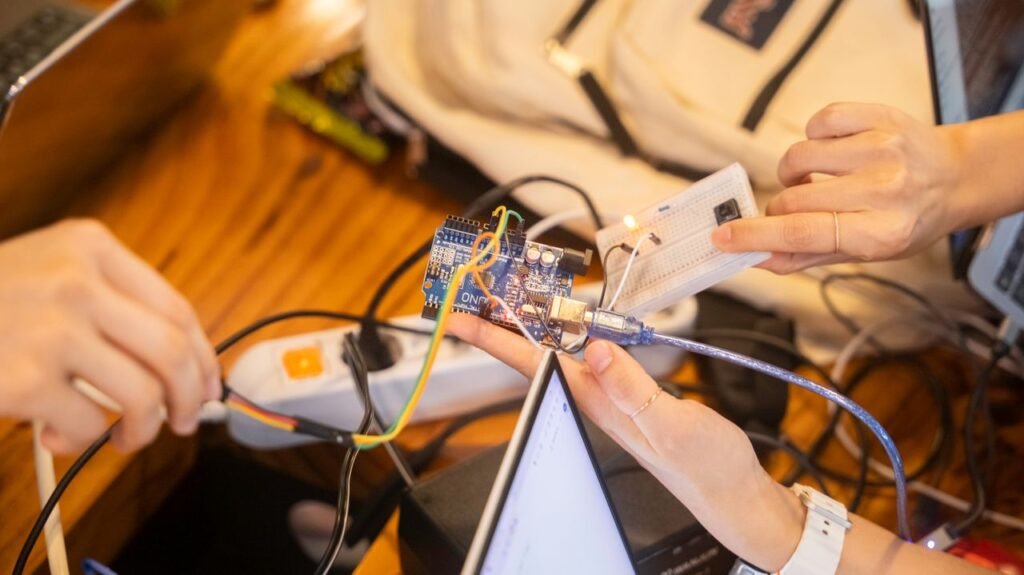
A developer puts a sensor prototype on, straps a wireless radio on, powers it up, and finds the battery dead after a day when the project requires it to run for weeks. This is one of the most frustrating and common moments in hardware development. And nearly always preventable.”
The root of the failure is one habit: to select the sensor and the wireless protocol independently, without the power budget as the first decision. Current is needed for always-on sensors and persistent wireless communication. Randomly stacking them together is an interesting prototype, but no one can implement it in the field. If a team gets the power budget wrong at the beginning of a project, they end up re-designing the entire sensing stack mid-project, replacing chips and rewriting firmware only to get to a battery life that was the starting point. Do it right, and a device can converse with the world in real time for months on a coin-cell battery.
This essay considers the relationship between sensors, edge artificial intelligence (AI) technology, and Bluetooth connectivity, using the Google Coral platform as a reference, so a project starts with the trade-offs recognized, not learnt the hard way.
The Three Pieces of Edge Sensing Hardware
The edge sensing systems of today generally have three basic parts: a processor to do local analysis of data; a collection of sensors to furnish it with signals from the real environment; and a wireless radio to transmit the results. None of them can stand alone, as the appropriate decision of one is very much dependent on the boundaries of the other two.
A good comparison here is Google’s Coral platform that is designed to accomplish just this, mix local AI inference on sensor data with wireless connectivity. Every project has trade-offs, and seeing how Coral deals with each issue makes them tangible; that is the objective of the sections below: to show the bigger themes.
The Processing Chip: Running AI on the Device
Coral’s core tech is built on the Edge TPU, a tiny custom chip designed to execute neural networks locally, fast and without needing to connect to the cloud. It accomplishes about 4 trillion operations a second, or 4 TOPS, at about 2 watts. That’s around 2 TOPS per watt. That’s the whole objective of the efficiency ratio. It is for gadgets that can’t afford to waste electricity. The Edge TPU supports TensorFlow Lite models and is available in several flavors, from a USB accelerator to a solderable module for custom boards.
Coral’s revolutionary NPU platform1 takes this efficiency to the next level for the smallest of devices. It is based on an open RISC-V architecture and targets ultra-low power always-on applications like wearables and ambient sensors with a power envelope as low as 10 milliwatts. That’s a completely different class of device, designed to sense all the time and not eat a bit of battery.
The first reason for local processing is straightforward. Running inference on-device instead of streaming raw data to the cloud reduces battery usage and latency, as the device only has to convey a small result, instead of a constant stream of raw sensor data. One change like that disrupts the whole power balance of a project.
The Sensors: Deciding What the Device Can Detect
The sensors you choose determine what a device is actually capable of sensing, and edge AI boards typically provide a mix of onboard and add-on options. The dedicated environmental sensor board in the Coral ecosystem is one example. It has an ambient light sensor, a barometric pressure sensor, and a combined humidity and temperature sensor all in one compact module, giving you standard environmental values out of the box.
Expansion connectors allow you to add extra sensors, actuators, or communication modules to a project without changing the underlying hardware. They make a prototype adaptable. In addition to basic environmental monitoring, most boards also have camera and microphone interfaces for vision and audio use cases. The main discipline, which is discussed more below, is to add only the sensors the application really needs.
The Radio: Getting Results Off the Device
Wireless is where a sensing project either stays under its power budget, or blows right past it. Bluetooth Low Energy (BLE) is the de facto standard for battery-powered sensor devices. A well-designed BLE stack can run for extended periods of time on a simple coin-cell battery. It was intended for low-power, low-latency, low-complexity communications.
Standard Bluetooth and Wi-Fi have higher data throughput, but this power comes at a cost, and they are better suited for devices that are plugged in or frequently recharged. Many edge AI boards offer more than one option in an expansion slot, so a project can choose Wi-Fi for high-bandwidth data or BLE for lightweight battery-friendly reporting. It is contingent upon how much data needs to be transferred.
Why Power Budget Has to Come First
All hardware decisions boil down to power budget, so that should be the first constraint a team sets, not the last thing you tick off before delivery. That’s how you end up wasting weeks on mid-project redesigns, treating it as an afterthought.
That is the whole drawing of a device. It is from three sources working together. The sensor, the processing chip, and the wireless radio. That’s why connectivity choices have such a big impact on battery life. The radio tends to use the most power when actively transmitting. This is best addressed through duty cycle, when a device wakes up to sense and transmit on a timetable rather than running continuously. A sensor that reports every minute and sleeps the rest of the time can live hundreds of times longer than one that never pauses, typically without losing any valuable data. It is this constraint that supports the always-on, ambient sensing architectures like Coral’s NPU platform. These designs are meant to allow all-day operation on devices that are too small or mobile to be recharged often.
Why Sensing Technology Is Moving to the Edge
The trend of recent years in sensing technology has been very much toward local, on-device processing, and that trend is driven by genuine constraints of cloud-only designs, not hype.
The first constraint is latency. Streaming raw sensor data to the cloud for every decision adds latency that many real-time applications can’t afford, whether it’s a wearable responding to a gesture or a security sensor alerting movement. Bandwidth and privacy are pulling in the same direction. By providing only a processed output rather than a continuous stream of raw audio or video, we decrease both network traffic and the quantity of sensitive data leaving a device. In addition, modern edge designs are meant to be safe by hardware, creating a secure enclave that protects important models and personal data against typical memory-based attacks. These pressures mean the edge is the natural home for modern sensing.
Choosing the Right Sensors for Your Project
The first part of the process of choosing the sensor mix is to know exactly what the application needs to sense, not what sensors you happen to have available. This focus on the aim keeps a design lean. Typical pairs include:
Ambient light and proximity sensors for context-aware wake-up triggers.
Barometric Pressure and Humidity Sensors for Indoor Climate or Weather Monitoring
Gesture or activity detection by means of motion and accelerometer sensors.
Microphones and cameras for vision- or audio-based inference
The proper number of sensors to meet the actual need is just as important as the right sorts of sensors. Adding sensors costs money and requires a small but meaningful amount of power. So a device that is loaded with sensors that it rarely utilizes pays for them in the form of decreased battery life. It’s also about disciplining yourself to add only what the application demands, respecting the power budget.
BLE Versus Wi-Fi Versus Cellular for Sensor Devices
The choice of a wireless protocol boils down to 3 questions: How much data needs to move, how often, and how much power can the device spare? Each choice answers those differently.
| Protocol | Best For | Data Volume | Power Use |
| Bluetooth Low Energy | Small, infrequent updates and alerts | Low | Very low, coin-cell friendly |
| Wi-Fi | Steady-power devices moving large data | High | Higher, needs regular power |
| Cellular | Remote sensors with no local network | Low to moderate | High, needs a real power source |
BLE is appropriate for devices that are delivering tiny, periodic updates such as a status reading or an alert, but not a steady stream. Wi-Fi is useful for devices that have a consistent power source and need to transport vast amounts of data quickly, such as streaming video or syncing massive records. Cellular has a smaller niche: remote sensors that don’t have a local network, but have enough power budget to pay the higher energy cost of a cellular radio. For most battery-powered edge sensors, BLE is the default assumption, and a project only climbs up from there when the data absolutely requires more.
Security and Privacy in On-Device Sensing
Local data processing can improve privacy by keeping the raw signals on the device, but it does not remove the need to explicitly design for security. No matter how little data exits the gadget, a few levels matter.
Hardware-enforced isolation, which sandboxes important models and personal data at the chip level, can protect against a wider range of assaults than software-only measures can handle alone. Encrypted wireless transport still matters, even for modest BLE payloads. A status update, or a sensor reading, can convey useful information if it travels in plain text. But the firmware update path deserves the same care as the sensors themselves, since an insecure update technique may quietly invalidate every other security decision made earlier in the design. Good edge security does all three as part of the architecture , not as add-ons.
Common Use Cases for Coral-Style Sensing Hardware
Edge AI sensing hardware developed this manner shows up in a repeating group of applications across consumer and industrial domains, all based on the same fundamental recipe of local processing, a matching sensor set and a right-sized wireless protocol:
Wearables that respond to gesture or movement or ambient sound
Environmental monitors – Monitor temperature, humidity, or air quality.
Smart home devices with local voice or presence detection.
Industrial sensors with unusually long battery life reporting equipment status.
The thing they have in common is that none of them could function as a cloud-only architecture. All of them need fast local response, low power, or privacy. That’s exactly what on-device sensing does.
Getting Started With a Coral Sensor Prototype
The upside of prototyping is that you may start simple: a sensor or two, a clear power budget, and BLE as the default connectivity choice, until the data volume manifestly needs more. This keeps the early work focused and debuggable, with no temptation to put everything in at once.
Building from scratch is not practical for this context, but development boards designed for it provide a useful head start as the camera, display, microphone, and wireless capabilities are already built in. The most essential early habit is to assess power draw under real duty cycle conditions, not a constant-on bench test. A device tested at full throttle would appear to be far more voracious than one measured as it really acts, waking up briefly and dozing frequently. Testing performance in real life helps to find battery life problems earlier than the final product.
Frequently Asked Questions
What is Google Coral used for?
Coral is a platform for building devices that run AI on the device itself, locally, not in the cloud. It pairs a power-efficient AI processor (Edge TPU or the upcoming ultra-low-power NPU) with sensor inputs and wireless connectivity and is especially suitable for smart cameras, wearables, environmental monitors, and similar edge devices.
How powerful is the Coral Edge TPU?
The Edge TPU does 4 trillion operations per second (4 TOPS) at about 2 watts of power, or about 2 TOPS/watt. It runs TensorFlow Lite models and is targeted at fast, efficient inference on low-power devices, not training big models.
Why use Bluetooth Low Energy for sensors instead of Wi-Fi?
BLE requires substantially less power, and a gadget can run for months on a small battery. It is appropriate for occasional low-volume delivery of readings or warnings. Wi-Fi is more faster but requires more power thus it’s better for devices that are plugged in, or that need to move huge volumes of data.
What is the biggest mistake in building a battery-powered sensor device?
Selection of radio and sensors before developing a power budget. Sensing costs energy. Wireless transmission is energy-intensive. Stack them together without a plan, and you will exhaust the battery far faster than planned, and usually require an expensive redesign. Avoid the temptation; establish the power budget first.
How do you make a sensor device last longer on battery?
The most suitable way is the duty cycle. This means the gadget will be sleeping most of the time, waking up intermittently to feel and communicate, and then going back to deep sleep. Together with a low-power processor and BLE, this can increase battery longevity from days to months.
The Bottom Line: Power First, Then Sensors, Then Connectivity
For maximally functioning edge sensing devices, the power budget should set the boundaries first, and then sensor selection and wireless connectivity should be chosen to fit within that boundary, not vise versa. The order of that order is the single strongest predictor of whether a technology makes it out of the lab.
Processing locally (with chips like Coral’s Edge TPU or its new ultra-low-power NPU) lowers latency and power drain compared to constant cloud streaming. Bluetooth Low Energy (BLE) enables battery-powered devices to run for months, not days, on a charge. A team that respects the order – power first, sensors second, connection third – builds a product that does what it said it would do, and well after the prototype phase.
Pingback: How to Use a Bluetooth Speaker? – Phone, PC, TV & More - Tech Journey Flow
Pingback: How Smart Home Technology Will Change Lives? - Tech Journey Flow
Pingback: How to Monitor Home Remotely with Smart Technology in 2026? - Tech Journey Flow
Pingback: Hardware For AI Radiocord Technologies: What It Takes to Build a Device That Actually Thinks - Tech Journey Flow
Pingback: Hardware and Firmware Integration: How Embedded Products Actually Come to Life - Tech Journey Flow
Pingback: System Architecture Design for Hardware Radiocord Technologies - Tech Journey Flow