
For most of the last century, stepping outside of your front door meant surrendering any real influence in what went on behind it. You put the key in. You hoped for the best. You came home, and that’s when you knew how the day really went.
It is in the space between departure and return that the danger dwells. Packages disappear from porches. A gradual leak under the sink warps a floor in silence. A burner on the stove is left on. A stranger waits at the door. And you sit at work or drive down a highway two states away.
It is not a matter of what has changed. It is the hold you have on it today. Already, the phone in your pocket can pull up your porch, your thermostat, and your front door lock in a matter of seconds, from anywhere with a signal.
The difficulty is that most people only scratch the surface of what the technology can do. They set up one camera, open the app a few times, and never think that a properly connected system could view the entire property and tell them the moment anything changes. But then you settle for that half measure, and you’re still guessing at the very moments that matter most: a thud at 2 a.m., a delivery van at midday, a storm rolling into a house nobody’s standing in.
This guide talks you through the full thing. You’ll find out which devices are really worth their salt, how to wire them into one system you can operate from one screen, where to put each one, and how to keep the data they collect from becoming a liability in itself.
Why Remote Monitoring Matters More Than Ever
Both break-ins and package thefts increase when a property looks unoccupied in the middle of the day, and the middle of the day is when most residences are empty presently. Remote monitoring closes the window without a sound, keeping a watchful eye on the property even when no one is physically present to observe anything.
The need has a lot to do with the size of porch theft alone. SafeWise’s 2025 Package Theft Report indicates that around 104 million parcels were stolen nationwide in one year, causing approximately $37 billion in economic harm and impacting almost one in four families. That amount actually decreased from the 120 million stolen in 2023, and increasing camera use is part of the reason the number is heading in a lower direction.
Homeowners plainly no longer think of this as a luxury. SafeHome’s 2026 home security market research found that nearly 61 percent of US households have at least one security camera, up from 52 percent just two years ago, and video doorbells are in almost half of all homes. Manufacturers have seen this and developed whole product lines around the assumption that customers expect to see and control their houses from a distance.
The same thing has been priced into insurance companies as well. Homeowners with a monitored security system can save an average of $100 a year, with reductions ranging from 5 to 20 percent, depending on the carrier and the devices, according to Policygenius. Monitored houses have fewer and smaller claims, so insurers give you that break because they still come out ahead by decreasing your price.
Nothing here replaces a good lock or plain old common sense. But it does provide something a locked door can never add by itself: a live, constant view of the location you care about, plus a record of what happened if something ever went wrong.
The Core Devices Behind Remote Monitoring
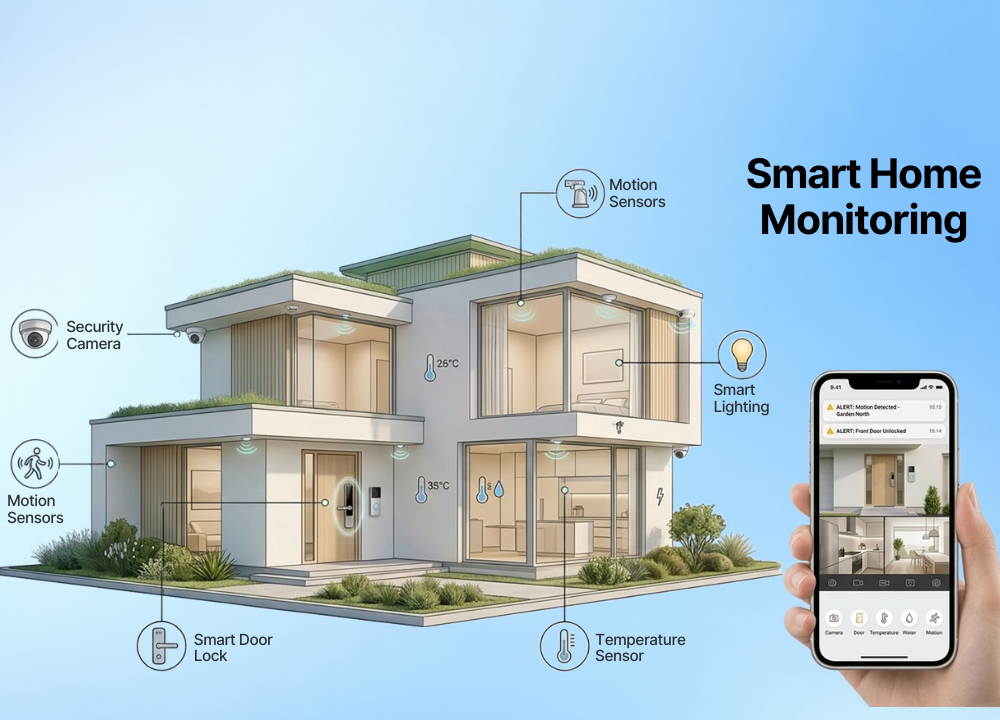
A real remote monitoring solution is not a single device. It’s a modest, purposeful collection of devices, each looking after a different weak place, all feeding info back to a single app on your phone.
If you get the mix right, you cover entrance points, air quality, water danger and everyday activities without paying double for the same protection. Get it incorrectly and you either leave holes a burglar walks right through or drown yourself in overlapping notifications you learn to ignore.
The categories below describe what each gadget type actually catches and, just as significantly, what it misses all by itself.
Cameras That Never Blink
Any monitoring system is based on indoor and outside cameras. They transmit live video on demand, film brief snippets when motion trips them, and save the footage on a local card or in the cloud, depending on the subscription you chose.
Outdoor models keep an eye on porches, driveways, and backyards where trouble frequently starts, spotting a package thief or unexpected face before anyone gets to the door. Indoor cameras are most effective when trained on choke points: a front hallway, the top of the stairs, or a place where youngsters and dogs spend their afternoons. Some parameters make the difference between a camera that is really useful and one that is only a decoration. A resolution of 2K or more allows you to read a license plate or recognize a face, instead of squinting at a haze. Most have a wide field of view, usually 130 degrees or more, to cover a complete yard from one mount. Night vision is very important, as most break-ins occur at night. Reliable nite vision could be infrared or full color.
The other choice that impacts your arrangement is power. Wired cameras never die, but need an outlet or a professional installation. Battery models go anywhere, but need a recharge every few months. Solar panels fill that gap for cameras sitting in the sun. If you want more than a watchful camera, be sure to look for two-way audio. That one feature is what makes it more than a passive recorder, letting you talk through it, whether warning off a stranger on the driveway or asking a delivery person where to drop the box.
Video Doorbells That Do Double Duty
The video doorbell combines a camera, a microphone, a speaker, and a motion sensor into the one gadget most people touch every single day. It answers the most fundamental question every homeowner ever asks, which is simply who is standing at my door right now.
Today’s doorbells do a lot more. Now most can identify a human from a car from a wandering animal, cutting the flow of needless pings to a trickle. That distinction goes from being a nice-to-have to being really important when you live on a busy street and would otherwise have to deal with dozens of warnings a day. Many versions additionally record a few seconds of video from just before the motion was triggered, so you see the complete approach rather than a person already at the glass.
Power divides doorbells into two categories. Wired versions wire into your existing doorbell wiring for constant power (and never need charging) whereas battery variants install in minutes, with no wiring at all but ask for a top-up every couple of months (more often if they sit on a high-traffic path). Either way, a doorbell with an interior chime means you can still hear visitors when your phone is buried in another room.
Sensors That Catch What Cameras Miss
Cameras can only see what they are pointed at. Sensors take care of everything else: the slow disasters, the quiet intrusions in locations where a lens will never be pointed.
They’re little, cheap, and easy to ignore, but they often prevent the most expensive damage of all. A busted pipe or a small leak you don’t notice might cost you thousands long before a burglar ever shows up.
Water leak sensors are placed under sinks and behind appliances, alerting you to a leak before it floods a floor.
Door and window sensors guarantee that all entrance points are closed and inform you as soon as one opens.
Smart smoke and carbon monoxide detectors can send you a warning to your phone, even if no one is home to hear the alarm.
Temperature sensors warn of a dead furnace before winter pipes freeze and burst.
Motion sensors look for general activity inside and can trigger cameras or lights automatically.
Glass-break sensors listen for the distinctive sound of shattering glass, covering windows a contact sensor can’t.
These smaller devices work together to fill up every blind spot a camera leaves behind, which is what turns a dispersed collection of gadgets into something that actually watches the full house.
Smart Locks That Put Access in Your Hands
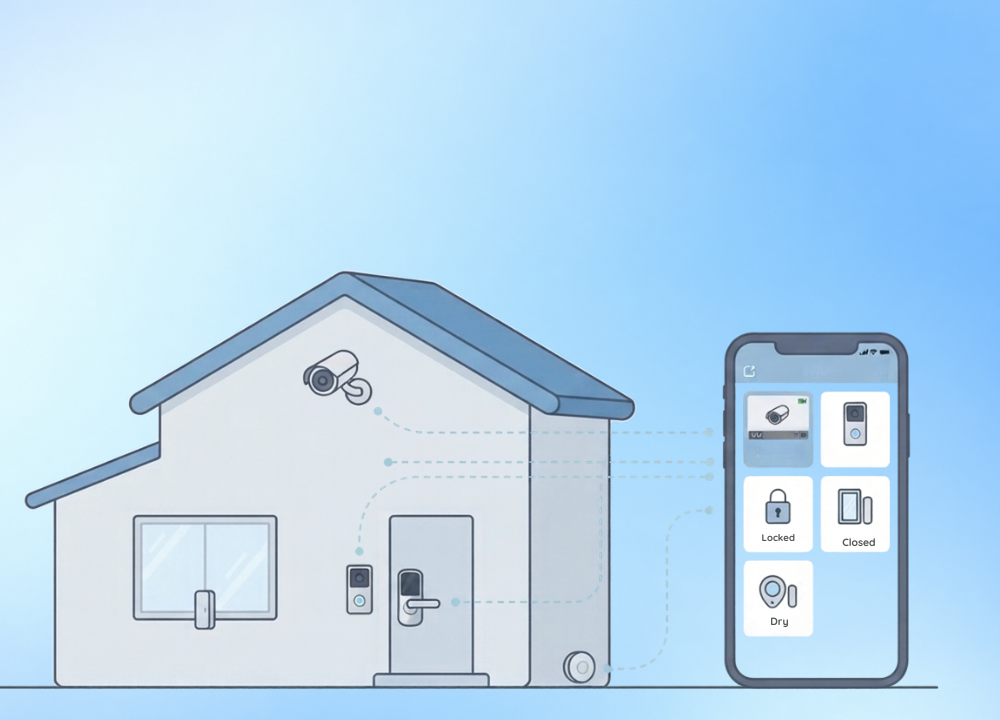
A smart lock is the device that allows you to do something with what your cameras show you, not just watch it happen. If a delivery driver arrives at your door, you may remotely open the latch, and then lock it again as soon as it’s inside the box.
The actual benefit is control over who gets in and when. You can give a cleaner or dog walker their own temporary code that expires on schedule, so you never have to cut a spare key that you then have to worry about. Auto-lock settings close the door behind you when you forget, and an activity log shows you exactly who unlocked it and when.
Most models sync with the same software that runs your cameras and sensors, so one screen tells you the door’s status along with everything else. Just keep the batteries fresh, since on most designs a dead smart lock still opens with a traditional key but loses all remote tricks until you swap the cells.
How to Set Up a Full Remote Monitoring System
The devices are the easy part to buy. Getting them to act like one big system, all visible from one screen, takes a little forethought up front that saves a great deal of frustration afterward.
Rush this stage, and you’ll find yourself juggling 4 different apps, chasing broken connections and missing the one alert that matters. Put an afternoon into it, and it pretty much runs itself.
Choosing a Hub and App That Ties It Together
Many gadgets today connect directly to your Wi-Fi, but until you get to five or six, the dedicated hub still earns its pay. It keeps all that traffic managed and steadying connections that would otherwise drop.
Matter has made this a lot less painful than it used to be. Matter, which has the backing of Apple, Google, Amazon, and Samsung, will allow you to run a camera from one brand and a lock from another via the same app, instead of pushing you into three rival ecosystems. The standard has recently been updated to significantly broaden the number of supported device types, which should make cross-brand setups even simpler.
Just choose your hub based on whatever voice assistant or phone you already use every day. If your household is Google-heavy, an Apple-first hub merely adds friction. And vise versa. But with consistency here, a hundred little annoyances down the road gently go away.
Getting Your Network Ready Before Anything Else
All the remote monitoring features you care about fall on your home network. So if your network is weak, the whole project is sunk – no matter how amazing the cameras are. This is the part most guides miss, and most people regret.
Cameras transmit constant video, which burns through bandwidth and requires good Wi-Fi coverage in the exact corners where gadgets sit — frequently the remote reaches of a yard or a basement. A mesh Wi-Fi system typically trumps a single router for reaching those edges. Good to know: Most cameras and sensors connect on the 2.4 GHz band instead of 5 GHz since 2.4 GHz travels farther and pushes through walls better, although it moves data more slowly.
If a camera is going offline often, it’s usually not a camera issue but a coverage or interference issue. The best way to fix most problems is to run an exterior camera on a wired connection if possible, or to add a mesh node near a cluster of devices. Hardware swaps fix significantly fewer problems.
Placing Devices Where They Actually Help
If you’re pointing a camera toward a blank wall, you’re recording nothing worth retaining, so placement demands considerable attention before you drill a single hole. First, entry points, always: the front door, the rear door, any ground floor window a person could plausibly climb through.
Next we have garages and driveways. They are continuously used by vehicles and deliveries. Both attract burglars. Point interior cameras toward corridors and common areas, not bedrooms and bathrooms, both for better coverage and for the basic decency of anyone living there.
The actual place is just as important as the height and angle. Mount the camera too low, and it can be bumped aside or blocked with a hand. Faces are awful. Fire it too high from way up high, and it snags the top of a head, but never a usable face. Somewhere around 9 feet, inclined slightly downward over the path people actually travel, seems to hit the sweet spot.
Testing Everything Before You Rely On It
Once all devices are mounted and linked, test each one exactly as real life will be. Walk by a motion sensor, open a monitored window, or ring the doorbell from outside and you’ll get the alert on your phone in seconds.
While you’re at it, check your notification settings. This is where most systems succeed or fail. Too many warnings and you start swiping them away reflexively, which means you will swipe away the crucial one too. Too few, and you miss the event the entire system was created to catch.
Then repeat the same test every couple of months. Firmware updates, router changes, and expired passwords break connections quietly all the time, and a camera that went offline quietly in March is worthless during a break-in in June.
Using AI to Cut Down on False Alarms
The first motion cameras indicated everything: a passing automobile, a swaying limb, the neighbour’s cat crossing the grass. That constant loudness trained an entire generation of owners to ignore their own security programs. Which totally contradicted the purpose.
Smarter detection turned that around, learning to distinguish a human from a car, a package, or a drifting shadow. Fewer false alarms mean the warnings you do get are genuinely worth your time. Many systems also enable you to draw in activity zones, so a camera may watch your walkway but disregard the public sidewalk beyond it.
Some configurations go a step further and detect familiar faces, not sounding the warning for those you live with but nevertheless raising a flag for a stranger. That one feature has done more to make remote monitoring actually bearable than just about any other update in recent years. But the tradeoff deserves to be named. Facial recognition and precise behavior tracking capture a lot of sensitive data, and that’s exactly why the privacy problems in the next section need genuine weight rather than a shrug.
Remote Monitoring for Aging Parents and Family
It’s a bigger burden than defending your own front door, watching over an aging parent from across town or across the nation. The stakes are higher. The guilt of not being there in person only weighs more heavily.
The goal changes too. You aren’t chasing invaders now. You are on the lookout for the silent emergencies of aging: a fall, a missed meal, a missed medicine, hoping to spot them soon enough to help.
Fall Detection and Wearable Alerts
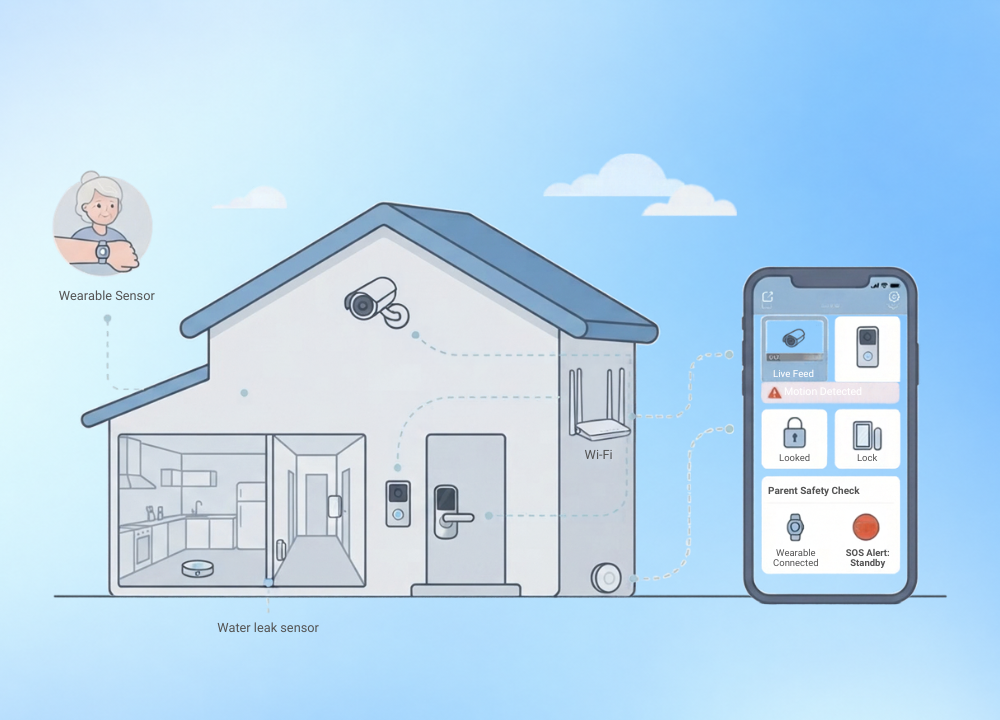
The traditional reason distance feels so scary is because of a fall: An older adult who goes down and can’t reach a phone may lie there for hours. Wearable pendants and watches with fall detection address it head-on, issuing a warning as soon as a heavy fall is registered, rather than waiting for the next planned check-in call.
The better systems allow your parent to cancel a false alarm by pushing a button, so you don’t need to call for help if the watch is dropped. Many also have a basic SOS button that they can click at will at any time they feel unwell, putting some control back in their hands.
Motion and Activity Patterns
You don’t have to have a single camera pointed at someone to find out a surprising lot about their welfare. Motion sensors throughout a parent’s home track the normal daily rhythm — and it’s the break in that regularity that tells the true tale.
The kitchen long past a regular breakfast time and the bedroom door that never opened all morning are signs that something may be awry. These passive sensors protect privacy as a camera never can, reporting movement and stillness without recording a face. For many families, it’s that combination of oversight and dignity that makes a parent consent to the setup in the first place.
Medication Reminders That Actually Get Used
One of the most preventable reasons older folks end up in the hospital is missed medicine. An investigation in Risk Management and Healthcare Policy linked about 1 in 10 hospital admissions to patients not taking their medicine as recommended, part of as much as $300 billion in unnecessary U.S. healthcare costs each year.
Quiet chimes, flashing lights, and a secured container that opens only at the correct time are how smart pill dispensers help with that problem. Connected versions will remind you when a dose gets skipped so you can make that call before a missed pill turns into a crisis. Here, a little push from a computer does a lot more help than most people would think, exactly because it takes the memory burden away from someone who might be juggling half a dozen medications.
Keeping Watch Without Crossing a Line
Nothing in these tools should feel like surveillance to the person on the other end, or the entire thing falls apart. The best setups are those established with the parent, not around them, and they begin with a frank talk about what each gadget can see and what it can’t.
Cameras tend to lose that discourse more readily than sensors and dispensers, because they defend without observing. If you do need a camera, a common area that everyone shares is far better than a bedroom. With a little care, modern technology does not take the place of a physical visit or a phone conversation. It simply lowers the distance between two houses and offers peace of mind to both sides.
Privacy and Security Concerns to Keep in Mind
More cameras and sensors imply more data streaming off your property, and every byte of it has to land somewhere. And that reality demands a close examination before you commit to any single brand, because a monitoring system you fail to secure can quietly become the very weakness you bought it to prevent.
The danger is neither imaginary nor unusual. It is consistent, automated, and focused on ordinary households, not simply high-value targets.
The Data Your Devices Send Out
When you look at the data, the volume of attacks on everyday linked homes is just staggering. Based on telemetry from 6.1 million homes, the 2025 IoT security landscape analysis from NETGEAR and Bitdefender discovered the average linked home is blocking nearly 29 attack attempts each day – nearly three times the attacks of a year ago.
The same study identifies some 22 connected devices in the typical smart home, and each is a door an attacker might try. Smart TVs, cameras and streaming devices took the most flak, mostly because owners rarely update them. What’s more, the survey discovered that almost one in five gadgets are still shipped with nothing but a default password that can be looked up online in seconds.
Locking Down Every App and Device
The good news is that the vast majority of that danger is removed by a handful of basic habits, and they don’t cost a dime. The most common mistake new smart home owners make is to bypass these procedures.
Set a strong, unique password for each device and app, never the factory default.
Turn on two-factor authentication anywhere a monitoring app has it.
Install firmware updates promptly, since they often close the very flaws that attackers target.
Secure your router first, because it is the front door behind which all other devices sit.
Put smart devices on a guest network to keep them away from phones and computers with personal files.
Set everything up, run through that list once, then check it again every time you add a new device. It is the one hour of highest return you will spend on the full system.
Cloud Storage Versus Local Storage
Where your footage lives is a true fork in the road, and both approaches have a serious trade-off. Cloud storage saves your clips on the company’s servers so you can bring up video from anywhere, never losing it if a robber walks off with the camera, but it normally charges a monthly membership and puts your material in someone else’s hands.
Local storage is all stored on a memory card or a drive inside the house, which means you’re in full control, and it circumvents the subscription completely. But that’s the catch. If the drive fails, gets stolen, or the camera itself is destroyed, you lose that film. Setting up remote access might be tougher too. Many users end up using a hybrid technique of preserving recent clips locally, but backing up the most significant events in the cloud. This balances control versus resilience.
Reading the Fine Print Before You Buy
Every camera manufacturer has a privacy policy that most purchasers would never read, and the differences between them are not insignificant. Before you spend a dollar, know who can see your saved film, how long the company retains it, and whether it ever shares it with third parties or law enforcement.
A few businesses have gotten legitimate criticism for these issues alone, so a few minutes of reading ahead of time can save you an unpleasant surprise later. Treat it like any contract involving video of your own family, since that’s exactly what it is.
What’s Next for Remote Home Monitoring
The next generation of monitoring technologies will do more than record what happens. “It’s going to start to predict it before it happens.
Systems trained on years of household data already warn us of strange patterns a person would never notice on their own, from a door left ajar too long to a pipe showing the faint early signs of a gradual leak. Such instruments are moving out of pure security into energy consumption, water management and elder-care, and the border between a security system and a comprehensive home-awareness system is blurring fast.
The wider use of the Matter standard should also help erode the brand lock-in that soured so many early adopters. The future where every device in the house talks the same language regardless of who made it is closer than ever.
The best thing to do right now is curiously simple. Pick the gap that keeps you up at night, whether it’s a front door, a basement that floods, or a parent living alone, and work outward from there, one gadget at a time.
Remote home monitoring was never about watching your house every minute of the day. It’s about knowing when something has changed so you never have to sit somewhere else and wonder.
For most of the last century, stepping outside of your front door meant surrendering any real influence in what went on behind it. You put the key in. You hoped for the best. You came home, and that’s when you knew how the day really went.
It is in the space between departure and return that the danger dwells. Packages disappear from porches. A gradual leak under the sink warps a floor in silence. A burner on the stove is left on. A stranger waits at the door. And you sit at work or drive down a highway two states away.
It is not a matter of what has changed. It is the hold you have on it today. Already, the phone in your pocket can pull up your porch, your thermostat, and your front door lock in a matter of seconds, from anywhere with a signal.
The difficulty is that most people only scratch the surface of what the technology can do. They set up one camera, open the app a few times, and never think that a properly connected system could view the entire property and tell them the moment anything changes. But then you settle for that half measure, and you’re still guessing at the very moments that matter most: a thud at 2 a.m., a delivery van at midday, a storm rolling into a house nobody’s standing in.
This guide talks you through the full thing. You’ll find out which devices are really worth their salt, how to wire them into one system you can operate from one screen, where to put each one, and how to keep the data they collect from becoming a liability in itself.
Why Remote Monitoring Matters More Than Ever
Both break-ins and package thefts increase when a property looks unoccupied in the middle of the day, and the middle of the day is when most residences are empty presently. Remote monitoring closes the window without a sound, keeping a watchful eye on the property even when no one is physically present to observe anything.
The need has a lot to do with the size of porch theft alone. SafeWise’s 2025 Package Theft Report indicates that around 104 million parcels were stolen nationwide in one year, causing approximately $37 billion in economic harm and impacting almost one in four families. That amount actually decreased from the 120 million stolen in 2023, and increasing camera use is part of the reason the number is heading in a lower direction.
Homeowners plainly no longer think of this as a luxury. SafeHome’s 2026 home security market research found that nearly 61 percent of US households have at least one security camera, up from 52 percent just two years ago, and video doorbells are in almost half of all homes. Manufacturers have seen this and developed whole product lines around the assumption that customers expect to see and control their houses from a distance.
The same thing has been priced into insurance companies as well. Homeowners with a monitored security system can save an average of $100 a year, with reductions ranging from 5 to 20 percent, depending on the carrier and the devices, according to Policygenius. Monitored houses have fewer and smaller claims, so insurers give you that break because they still come out ahead by decreasing your price.
Nothing here replaces a good lock or plain old common sense. But it does provide something a locked door can never add by itself: a live, constant view of the location you care about, plus a record of what happened if something ever went wrong.
The Core Devices Behind Remote Monitoring
A real remote monitoring solution is not a single device. It’s a modest, purposeful collection of devices, each looking after a different weak place, all feeding info back to a single app on your phone.
If you get the mix right, you cover entrance points, air quality, water danger and everyday activities without paying double for the same protection. Get it incorrectly and you either leave holes a burglar walks right through or drown yourself in overlapping notifications you learn to ignore.
The categories below describe what each gadget type actually catches and, just as significantly, what it misses all by itself.
Cameras That Never Blink
Any monitoring system is based on indoor and outside cameras. They transmit live video on demand, film brief snippets when motion trips them, and save the footage on a local card or in the cloud, depending on the subscription you chose.
Outdoor models keep an eye on porches, driveways, and backyards where trouble frequently starts, spotting a package thief or unexpected face before anyone gets to the door. Indoor cameras are most effective when trained on choke points: a front hallway, the top of the stairs, or a place where youngsters and dogs spend their afternoons. Some parameters make the difference between a camera that is really useful and one that is only a decoration. A resolution of 2K or more allows you to read a license plate or recognize a face, instead of squinting at a haze. Most have a wide field of view, usually 130 degrees or more, to cover a complete yard from one mount. Night vision is very important, as most break-ins occur at night. Reliable nite vision could be infrared or full color.
The other choice that impacts your arrangement is power. Wired cameras never die, but need an outlet or a professional installation. Battery models go anywhere, but need a recharge every few months. Solar panels fill that gap for cameras sitting in the sun. If you want more than a watchful camera, be sure to look for two-way audio. That one feature is what makes it more than a passive recorder, letting you talk through it, whether warning off a stranger on the driveway or asking a delivery person where to drop the box.
Video Doorbells That Do Double Duty
The video doorbell combines a camera, a microphone, a speaker, and a motion sensor into the one gadget most people touch every single day. It answers the most fundamental question every homeowner ever asks, which is simply who is standing at my door right now.
Today’s doorbells do a lot more. Now most can identify a human from a car from a wandering animal, cutting the flow of needless pings to a trickle. That distinction goes from being a nice-to-have to being really important when you live on a busy street and would otherwise have to deal with dozens of warnings a day. Many versions additionally record a few seconds of video from just before the motion was triggered, so you see the complete approach rather than a person already at the glass.
Power divides doorbells into two categories. Wired versions wire into your existing doorbell wiring for constant power (and never need charging) whereas battery variants install in minutes, with no wiring at all but ask for a top-up every couple of months (more often if they sit on a high-traffic path). Either way, a doorbell with an interior chime means you can still hear visitors when your phone is buried in another room.
Sensors That Catch What Cameras Miss
Cameras can only see what they are pointed at. Sensors take care of everything else: the slow disasters, the quiet intrusions in locations where a lens will never be pointed.
They’re little, cheap, and easy to ignore, but they often prevent the most expensive damage of all. A busted pipe or a small leak you don’t notice might cost you thousands long before a burglar ever shows up.
Water leak sensors are placed under sinks and behind appliances, alerting you to a leak before it floods a floor.
Door and window sensors guarantee that all entrance points are closed and inform you as soon as one opens.
Smart smoke and carbon monoxide detectors can send you a warning to your phone, even if no one is home to hear the alarm.
Temperature sensors warn of a dead furnace before winter pipes freeze and burst.
Motion sensors look for general activity inside and can trigger cameras or lights automatically.
Glass-break sensors listen for the distinctive sound of shattering glass, covering windows a contact sensor can’t.
These smaller devices work together to fill up every blind spot a camera leaves behind, which is what turns a dispersed collection of gadgets into something that actually watches the full house.
Smart Locks That Put Access in Your Hands
A smart lock is the device that allows you to do something with what your cameras show you, not just watch it happen. If a delivery driver arrives at your door, you may remotely open the latch, and then lock it again as soon as it’s inside the box.
The actual benefit is control over who gets in and when. You can give a cleaner or dog walker their own temporary code that expires on schedule, so you never have to cut a spare key that you then have to worry about. Auto-lock settings close the door behind you when you forget, and an activity log shows you exactly who unlocked it and when.
Most models sync with the same software that runs your cameras and sensors, so one screen tells you the door’s status along with everything else. Just keep the batteries fresh, since on most designs a dead smart lock still opens with a traditional key but loses all remote tricks until you swap the cells.
How to Set Up a Full Remote Monitoring System
The devices are the easy part to buy. Getting them to act like one big system, all visible from one screen, takes a little forethought up front that saves a great deal of frustration afterward.
Rush this stage, and you’ll find yourself juggling 4 different apps, chasing broken connections and missing the one alert that matters. Put an afternoon into it, and it pretty much runs itself.
Choosing a Hub and App That Ties It Together
Many gadgets today connect directly to your Wi-Fi, but until you get to five or six, the dedicated hub still earns its pay. It keeps all that traffic managed and steadying connections that would otherwise drop.
Matter has made this a lot less painful than it used to be. Matter, which has the backing of Apple, Google, Amazon, and Samsung, will allow you to run a camera from one brand and a lock from another via the same app, instead of pushing you into three rival ecosystems. The standard has recently been updated to significantly broaden the number of supported device types, which should make cross-brand setups even simpler.
Just choose your hub based on whatever voice assistant or phone you already use every day. If your household is Google-heavy, an Apple-first hub merely adds friction. And vise versa. But with consistency here, a hundred little annoyances down the road gently go away.
Getting Your Network Ready Before Anything Else
All the remote monitoring features you care about fall on your home network. So if your network is weak, the whole project is sunk – no matter how amazing the cameras are. This is the part most guides miss, and most people regret.
Cameras transmit constant video, which burns through bandwidth and requires good Wi-Fi coverage in the exact corners where gadgets sit — frequently the remote reaches of a yard or a basement. A mesh Wi-Fi system typically trumps a single router for reaching those edges. Good to know: Most cameras and sensors connect on the 2.4 GHz band instead of 5 GHz since 2.4 GHz travels farther and pushes through walls better, although it moves data more slowly.
If a camera is going offline often, it’s usually not a camera issue but a coverage or interference issue. The best way to fix most problems is to run an exterior camera on a wired connection if possible, or to add a mesh node near a cluster of devices. Hardware swaps fix significantly fewer problems.
Placing Devices Where They Actually Help
If you’re pointing a camera toward a blank wall, you’re recording nothing worth retaining, so placement demands considerable attention before you drill a single hole. First, entry points, always: the front door, the rear door, any ground floor window a person could plausibly climb through.
Next we have garages and driveways. They are continuously used by vehicles and deliveries. Both attract burglars. Point interior cameras toward corridors and common areas, not bedrooms and bathrooms, both for better coverage and for the basic decency of anyone living there.
The actual place is just as important as the height and angle. Mount the camera too low, and it can be bumped aside or blocked with a hand. Faces are awful. Fire it too high from way up high, and it snags the top of a head, but never a usable face. Somewhere around 9 feet, inclined slightly downward over the path people actually travel, seems to hit the sweet spot.
Testing Everything Before You Rely On It
Once all devices are mounted and linked, test each one exactly as real life will be. Walk by a motion sensor, open a monitored window, or ring the doorbell from outside and you’ll get the alert on your phone in seconds.
While you’re at it, check your notification settings. This is where most systems succeed or fail. Too many warnings and you start swiping them away reflexively, which means you will swipe away the crucial one too. Too few, and you miss the event the entire system was created to catch.
Then repeat the same test every couple of months. Firmware updates, router changes, and expired passwords break connections quietly all the time, and a camera that went offline quietly in March is worthless during a break-in in June.
Using AI to Cut Down on False Alarms
The first motion cameras indicated everything: a passing automobile, a swaying limb, the neighbour’s cat crossing the grass. That constant loudness trained an entire generation of owners to ignore their own security programs. Which totally contradicted the purpose.
Smarter detection turned that around, learning to distinguish a human from a car, a package, or a drifting shadow. Fewer false alarms mean the warnings you do get are genuinely worth your time. Many systems also enable you to draw in activity zones, so a camera may watch your walkway but disregard the public sidewalk beyond it.
Some configurations go a step further and detect familiar faces, not sounding the warning for those you live with but nevertheless raising a flag for a stranger. That one feature has done more to make remote monitoring actually bearable than just about any other update in recent years. But the tradeoff deserves to be named. Facial recognition and precise behavior tracking capture a lot of sensitive data, and that’s exactly why the privacy problems in the next section need genuine weight rather than a shrug.
Remote Monitoring for Aging Parents and Family
It’s a bigger burden than defending your own front door, watching over an aging parent from across town or across the nation. The stakes are higher. The guilt of not being there in person only weighs more heavily.
The goal changes too. You aren’t chasing invaders now. You are on the lookout for the silent emergencies of aging: a fall, a missed meal, a missed medicine, hoping to spot them soon enough to help.
Fall Detection and Wearable Alerts
The traditional reason distance feels so scary is because of a fall: An older adult who goes down and can’t reach a phone may lie there for hours. Wearable pendants and watches with fall detection address it head-on, issuing a warning as soon as a heavy fall is registered, rather than waiting for the next planned check-in call.
The better systems allow your parent to cancel a false alarm by pushing a button, so you don’t need to call for help if the watch is dropped. Many also have a basic SOS button that they can click at will at any time they feel unwell, putting some control back in their hands.
Motion and Activity Patterns
You don’t have to have a single camera pointed at someone to find out a surprising lot about their welfare. Motion sensors throughout a parent’s home track the normal daily rhythm — and it’s the break in that regularity that tells the true tale.
The kitchen long past a regular breakfast time and the bedroom door that never opened all morning are signs that something may be awry. These passive sensors protect privacy as a camera never can, reporting movement and stillness without recording a face. For many families, it’s that combination of oversight and dignity that makes a parent consent to the setup in the first place.
Medication Reminders That Actually Get Used
One of the most preventable reasons older folks end up in the hospital is missed medicine. An investigation in Risk Management and Healthcare Policy linked about 1 in 10 hospital admissions to patients not taking their medicine as recommended, part of as much as $300 billion in unnecessary U.S. healthcare costs each year.
Quiet chimes, flashing lights, and a secured container that opens only at the correct time are how smart pill dispensers help with that problem. Connected versions will remind you when a dose gets skipped so you can make that call before a missed pill turns into a crisis. Here, a little push from a computer does a lot more help than most people would think, exactly because it takes the memory burden away from someone who might be juggling half a dozen medications.
Keeping Watch Without Crossing a Line
Nothing in these tools should feel like surveillance to the person on the other end, or the entire thing falls apart. The best setups are those established with the parent, not around them, and they begin with a frank talk about what each gadget can see and what it can’t.
Cameras tend to lose that discourse more readily than sensors and dispensers, because they defend without observing. If you do need a camera, a common area that everyone shares is far better than a bedroom. With a little care, modern technology does not take the place of a physical visit or a phone conversation. It simply lowers the distance between two houses and offers peace of mind to both sides.
Privacy and Security Concerns to Keep in Mind
More cameras and sensors imply more data streaming off your property, and every byte of it has to land somewhere. And that reality demands a close examination before you commit to any single brand, because a monitoring system you fail to secure can quietly become the very weakness you bought it to prevent.
The danger is neither imaginary nor unusual. It is consistent, automated, and focused on ordinary households, not simply high-value targets.
The Data Your Devices Send Out
When you look at the data, the volume of attacks on everyday linked homes is just staggering. Based on telemetry from 6.1 million homes, the 2025 IoT security landscape analysis from NETGEAR and Bitdefender discovered the average linked home is blocking nearly 29 attack attempts each day – nearly three times the attacks of a year ago.
The same study identifies some 22 connected devices in the typical smart home, and each is a door an attacker might try. Smart TVs, cameras and streaming devices took the most flak, mostly because owners rarely update them. What’s more, the survey discovered that almost one in five gadgets are still shipped with nothing but a default password that can be looked up online in seconds.
Locking Down Every App and Device
The good news is that the vast majority of that danger is removed by a handful of basic habits, and they don’t cost a dime. The most common mistake new smart home owners make is to bypass these procedures.
Set a strong, unique password for each device and app, never the factory default.
Turn on two-factor authentication anywhere a monitoring app has it.
Install firmware updates promptly, since they often close the very flaws that attackers target.
Secure your router first, because it is the front door behind which all other devices sit.
Put smart devices on a guest network to keep them away from phones and computers with personal files.
Set everything up, run through that list once, then check it again every time you add a new device. It is the one hour of highest return you will spend on the full system.
Cloud Storage Versus Local Storage
Where your footage lives is a true fork in the road, and both approaches have a serious trade-off. Cloud storage saves your clips on the company’s servers so you can bring up video from anywhere, never losing it if a robber walks off with the camera, but it normally charges a monthly membership and puts your material in someone else’s hands.
Local storage is all stored on a memory card or a drive inside the house, which means you’re in full control, and it circumvents the subscription completely. But that’s the catch. If the drive fails, gets stolen, or the camera itself is destroyed, you lose that film. Setting up remote access might be tougher too. Many users end up using a hybrid technique of preserving recent clips locally, but backing up the most significant events in the cloud. This balances control versus resilience.
Reading the Fine Print Before You Buy
Every camera manufacturer has a privacy policy that most purchasers would never read, and the differences between them are not insignificant. Before you spend a dollar, know who can see your saved film, how long the company retains it, and whether it ever shares it with third parties or law enforcement.
A few businesses have gotten legitimate criticism for these issues alone, so a few minutes of reading ahead of time can save you an unpleasant surprise later. Treat it like any contract involving video of your own family, since that’s exactly what it is.
What’s Next for Remote Home Monitoring
The next generation of monitoring technologies will do more than record what happens. “It’s going to start to predict it before it happens.
Systems trained on years of household data already warn us of strange patterns a person would never notice on their own, from a door left ajar too long to a pipe showing the faint early signs of a gradual leak. Such instruments are moving out of pure security into energy consumption, water management and elder-care, and the border between a security system and a comprehensive home-awareness system is blurring fast.
The wider use of the Matter standard should also help erode the brand lock-in that soured so many early adopters. The future where every device in the house talks the same language regardless of who made it is closer than ever.
The best thing to do right now is curiously simple. Pick the gap that keeps you up at night, whether it’s a front door, a basement that floods, or a parent living alone, and work outward from there, one gadget at a time.
Remote home monitoring was never about watching your house every minute of the day. It’s about knowing when something has changed so you never have to sit somewhere else and wonder.
Pingback: How Smart Home Technology Will Change Lives? - Tech Journey Flow
Pingback: How Future Healthcare Technology Is Elevating At Home Care - Tech Journey Flow
Pingback: What Is Health Information Technology? A Complete, Plain-Language Guide - Tech Journey Flow