
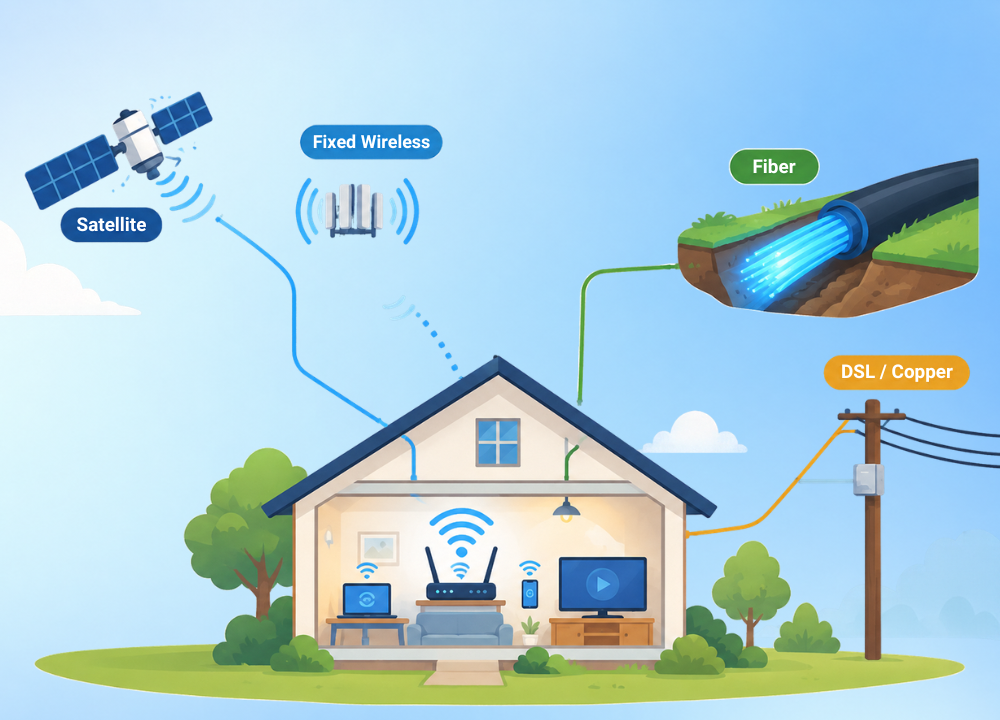
Picking a home internet subscription is harder than it should be. Providers throw around jargon like fiber, fixed wireless, and DSL, and you’re left to figure out what any of it means.
It’s not your fault you become confused. There isn’t one way the internet comes to your house. The labels really do mean different things.
Some connections move through the glass like light. Others travel on copper wire, on radio waves from a tower, on a signal reflected off a satellite. They act each time differently.
Choose poorly, and you are stuck. Buffering streams, video calls freezing, or a bill that jumps faster than the speed you really get.
The fix begins with knowing what is real, where you are. Availability is by block, and the best option on paper might never come to your street.
Here’s everything you need, all in one location. All the big stuff that makes the internet happen in your house, how much it costs, how much speed you really need, and the hardware that gets the signal to your walls.
How Home Internet Actually Reaches Your House
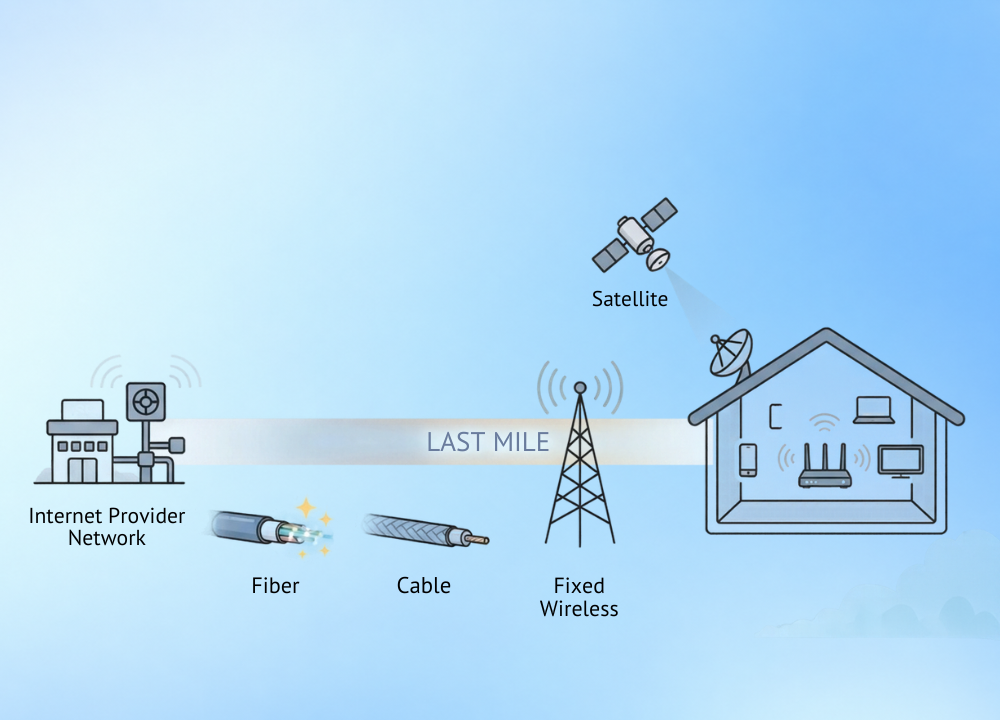
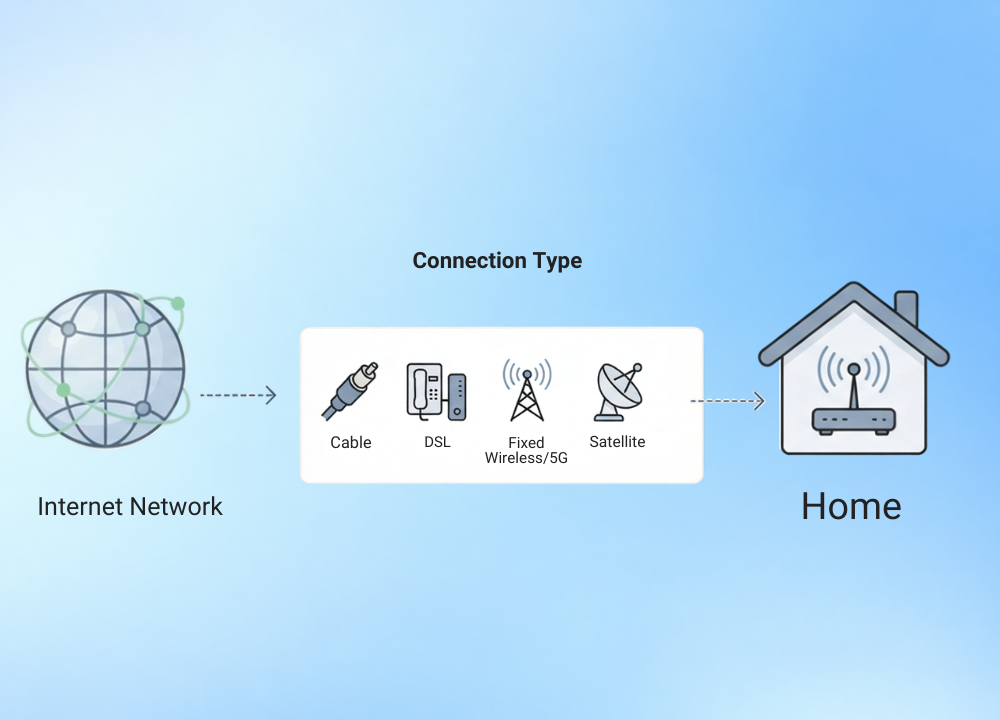
All connections start the same. A signal leaves a provider’s network and travels some physical or wireless path to your residence.
It’s that last stretch that the technologies diverge. It is what people in the industry call the “last mile,” and it is the section that determines your pace.
Fiber transmits data as light. Cable jams it down the coax cables that supplied your TV formerly. Wireless alternatives avoid underground wire and use towers or satellites instead.
The FCC’s 2026 broadband study now defines genuine broadband as at least 100 Mbps download and 20 Mbps upload. That bar went up in 2024, from the existing 25/3 Mbps norm that has been around since 2015.
“The reach is wider than most people realize.” As the FCC’s broadband deployment numbers show, when you count fiber, cable, and fixed wireless, about 97 percent of Americans can now access fixed terrestrial service that meets that speed.
The phrase “terrestrial” is important here. It excludes satellite, which has near-universal coverage, but with trade-offs that we discuss later on.
A lot relies on where you live as to whether a technology actually reaches your address. Providers lay out unevenly, so a fast roadway and a sluggish street can be a mile apart.
Download Versus Upload, And Why Both Matter
Most plans promote download speed in big numbers. That figure includes the data you pull in – streaming, browsing, and downloading files.
Upload speed is the other way around. It allows you to make video calls, save to the cloud, post content, and send large files outside of your home.
Uploads weren’t really important to most homes for years. Remote employment, video conferencing, and people uploading videos changed all of that overnight. Which is why the FCC now builds a 20 Mbps upload floor into its definition.
Latency, The Number Nobody Advertises
Speed informs you how much data is moving. Latency is measured in milliseconds and shows how quickly a single request goes out and comes back.
Low latency is what makes a video call feel natural and a game responsive. A fast download speed with high latency will still feel laggy when time is important.
This single number discreetly distinguishes the below technologies. Fiber and cable keep delay low. Fixed wireless is a generation behind. Older satellite made it painful.
Fiber Optic Internet Leads The Pack
Instead of electrical signals moving through metal, fiber transmits data as pulses of light traveling along hair-thin strands of glass. That one change is why it wins almost every speed test.
Availability has taken off. Some 52% of US households might have access to fiber by 2026, up from 46% in only the previous year, according to Reviews.org, which used FCC numbers.
A lot of that progress is connected with money. BEAD, a $42 billion federal program, is supporting fiber projects in locations that providers previously said were too unprofitable to serve.
Why Fiber Wins On Speed And Stability
Fiber plans typically come with a full gigabit, and many providers now offer 2-gigabit and 5-gigabit tiers for heavier households. Cable is nearly never able to do that. Download speeds are usually similar to upload speeds.
That’s fiber’s sneaky superpower of upload parity. Upload is the basis for video conversations, cloud backups, and publishing massive files, and it’s exactly what older technologies struggle with.
Latency is also very low, often under 15 milliseconds. That kind of responsiveness is the name of the game for competitive gaming, live video, or anything where lag kills the moment.
Reliability makes the case whole. Glass doesn’t corrode like copper, and it ignores the electrical interference that can plague other connection types.
What Fiber Costs
In fact, fiber prices have declined as networks have grown. Most plans start in the mid-$50s for a few hundred megabits and go up to $90 or more for gigabit tiers.
Most fiber providers don’t do data caps and offer you the equipment. They also prefer to avoid the promotional price rise that cable consumers get hit with after the first year.
The Catch With Fiber Availability
Performance is not the true limit. That is, if the line ever gets to you.
Rural communities are still a long way behind urban areas. About half of urban regions have access to fiber compared to about 40% of rural ones — a discrepancy the BEAD buildout hopes to narrow during the rest of the decade.
If fiber is available to your address, it’s almost always the best option. When it doesn’t, the options below fill the void it left.
Cable Internet Still Powers Millions Of Homes
Cable internet flows through the same coaxial connections that delivered television into living rooms. That head start gives it staying power.
It’s still the technology with the most subscriptions in the country. According to Leichtman Research Group, cable accounts for about 60% of home broadband connections because cable networks were built decades before fiber was widely deployed.
Speeds, Uploads, And The Shared-Line Problem
Modern cable plans today are in the hundreds of megabits, and new enhancements are pushing some providers into the multi-gigabit download tiers. Some 92 percent of the U.S. cable plant can now supply gigabit speeds.
Upload is the Achilles heel. Download might sound good, but upload is typically miles behind. That’s tough for remote employees and creators handling massive files.
Cable also shares bandwidth with other neighbors on that connection. In populated regions, speeds can drop a little during peak nighttime hours when everyone is streaming at the same time.
What Cable Costs, And The Fine Print
Standard speed cable normally costs between $50 and $80 a month. The headline price is usually a 12- to 24-month promo, then jumps $20 to $35 when it ends.
Some cable providers still do meter data. They have limits usually around 1 or 1.25 TB, and if you go over, they charge you overage costs. Also check out renting equipment, typically 10-15 a month if you don’t offer your own modem.
A Category Facing Its First Real Decline
Something has changed recently. Cable had a real turning point in 2025, with its first year of net subscriber losses as a category after many years of continuous growth.
Competition is the cause. Cable is under threat from two directions: fiber is eating its lunch in the cities, and 5G home internet is stealing users in the suburbs.
Newer protocols like DOCSIS 4.0 are beginning to close the upload gap. The big open question for the business is whether that comes soon enough to arrest the losses.
DSL Remains A Fallback In Older Neighborhoods
DSL (Digital Subscriber Line) uses your present copper telephone lines to deliver the internet. It was one of the first widely available home alternatives and currently the oldest of the lot.
Speeds never keep up with anything modern; DSL is generally much less than 100 Mbps. The farther away from the provider’s infrastructure your residence is, the weaker the signal.
That distance rule is built into the technology. A home close to the hub might have a decent connection, but one a few miles off can hardly load a movie.
And even if the age, DSL does play a real role. It’s still widespread in sections of the rural Midwest and South, and remains a cheap, reliable stopgap where fiber and cable haven’t arrived yet.
But its days are numbered. Providers are pulling copper lines, and many DSL customers are getting reminders to move to fiber, cable, or fixed wireless.
Fixed Wireless And 5G Home Internet Skip The Wires Entirely
Advertized as 5G home internet, fixed wireless access shoots broadband from the same cell towers that serve your phone. No cable needs to ever reach the house.
The category has gone crazy. By early 2026, the three largest carriers had more than 15 million fixed-wireless subscribers, a subscriber base that scarcely existed just a few years ago.
That gain was nearly completely at the expense of cable. Indeed, fixed wireless has accounted for nearly all of the net growth of the broadband market for several consecutive quarters.
How A 5G Gateway Turns Cell Signal Into Wi-Fi
A small receiver, sometimes referred to as a gateway, sits by a window and pulls signal from a nearby tower. It then makes that connection into a regular Wi-Fi network for a home.
Takes minutes to set up, not meetings. There’s no professional visit or buried line, so most providers will just mail you the box and let you connect it yourself.
Download speeds are 70 to 300 Mbps in typical conditions, depending on how far you are from the tower and how busy it is. That should be more than enough for streaming, browsing, and video calls in most houses.
And speeds have also been increasing. T-Mobile’s median fixed wireless download has increased by about three times since introduction in 2021, despite millions of extra subscribers added to the same network.
The Pricing Advantage
Fixed wifi is frequently the most stable-priced alternative available. Standalone plans cost between 50-80; however, bundling with a phone line can lower that to approximately $35.
The appeal goes beyond the number. Most carriers include the gateway, skip data caps, avoid contracts, and freeze the cost for years, so you don’t get hit with the promo-jump surprise.
Where Fixed Wireless Makes The Most Sense
Fixed wireless works well in the suburbs and in the semi-rural areas just beyond the reach of fiber or cable. Fiber still wins where fiber is already.
Homes without a cable or fiber line nearby
Renters who desire fast setup, no technician visit.
No contracts or data caps for budget-minded households.
Areas with good mid-band 5G coverage from a nearby tower.
Capacity is a true limit. Towers support phones and homes at the same time, so some providers are sitting in traffic and not taking on new signups until they boost capacity.
Satellite Internet Reaches Where Cables Never Will
Satellite Internet transmits data back and forth from satellites in space to a dish installed at your home. It is there for the locations no wire or tower will ever really reach.
Older providers parked their satellites high above the Earth, which caused agonizing delay on every click and call. Newer low-orbit systems changed that story overnight.
The Low-Earth-Orbit Leap That Changed Everything
The ancient geostationary satellites orbit 22,000 miles overhead. That’s a 600-millisecond or greater round trip for a signal, enough to make video calls and games nearly unplayable.
Starlink and other low-Earth-orbit networks fly much closer, about 340 to 570 kilometers overhead. That shorter travel gets latency down into the 25-60 ms range, around what you get with cable.
This has led Starlink to scale dramatically. By mid-2026, the service had 12 million subscribers globally, with the largest satellite constellation ever created.
Real-world speeds are now in a genuinely workable zone. Download speeds are often considerably above 100 Mbps for U.S. customers, and are best in less congested places, with a drop-off during busy evening hours.
What Satellite Still Costs You
These days, it’s usually price, not performance, that’s the sticking point. Monthly service is usually more expensive than wired choices, plus an up-front hardware cost that can be a few hundred to much more.
The older geostationary carriers are still there as a last choice, but they are much behind. Where accessible, the modern low-orbit networks are the clear choice. High latency and tight data limits.
The weather can also get in the way. Heavy storms and high cloud cover can momentarily cut the signal, but significantly less so than older systems.
None of it beats the upside for a rural cabin, farm, or isolated residence. Satellite is often the only viable way to get a fast, contemporary connection.
How The Technologies Compare At A Glance
Each choice has its trade-offs in terms of speed, cost, and availability. Here’s a brief look at where each of them is at in 2026.
| Technology | Typical Download | Upload | Latency | Rough Monthly Cost |
| Fiber | 300 Mbps to 5 Gbps | Symmetrical | Under 15 ms | $55 to $90+ |
| Cable | 100 to 1,000+ Mbps | Much lower | 15 to 30 ms | $50 to $80 |
| Fixed wireless (5G) | 70 to 300 Mbps | Lower | 20 to 50 ms | $35 to $80 |
| Satellite (LEO) | 50 to 200+ Mbps | Lower | 25 to 60 ms | $50 to $120+ |
| DSL | Under 100 Mbps | Much lower | 25 to 50 ms | Around $50 to $60 |
Read it as a beginning, not a conclusion. Your real numbers depend on your address, your provider, and how busy the network is at night.
How Much Internet Speed Do You Actually Need?
Here, bigger is not always better. One of the most typical money leaks in residential internet is paying for a gigabit when you’re only using a quarter of it.
The right quantity depends on how many people and devices are using the line and what they’re doing at the same time. A single 4K feed takes around 25 Mbps, while a competitive game takes nearly no bandwidth, but very low latency.
Matching Speed To Your Household
Use these as practical baselines and then add some headroom for the dips in peak hour.
One or two people. Sunlight and browsing. 50 to 100 Mbps.
Two people working from home with 4K TVs: about 200 Mbps.
Family of four with a mix of streaming, gaming, and smart devices: 300 to 500 Mbps.
Heavy multi-gig users, big files or several 4K streams at once: gigabit or more.
Most homes overpay buying on headline speed alone. Research indicates that the vast majority of gigabit subscribers rarely use even 350 Mbps at peak.
Why Upload And Latency Often Matter More
If you make a lot of video calls or upload large files, upload speed may be more important than a big download number. This is where symmetrical fiber wins over cable.
For gamers, latency trumps raw speed every single time. In fast-paced games, it is better to have a modest connection with a low ping than a gigabit plan with a high ping.
How To Check What Is Actually Available At Your Address
Provider sites’ coverage maps are often overly optimistic. The best way is to enter your full address into each provider’s checker, not just your ZIP code.
The FCC’s national broadband map is a good check. It tells you who, what, and where services are being reported at your particular location, highlighting options you may not have known were available.
Talking to neighbors helps too, but only to a point. Fiber and cable can cease mid-street, thus a fast connection next door does not ensure the same at your door.
Before you commit, ask each provider a few candid questions. What is the pricing after the promo ends, is there a data cap, is the equipment included, and is there a contract or early-termination fee?
When Your Internet Feels Slow, Start Here
A slow connection is generally the indoor configuration, not the strategy. Before you upgrade or switch, rule out the inexpensive fixes first.
Run a speed test with your device plugged directly into the router using Ethernet. If the wired speed matches what you pay for, the problem is your Wi-Fi, not your provider.
Router location fixes a surprising amount. Move it out of a cupboard, off the floor, and toward the middle of your home rather than a far corner.
Restart the router and gateway; it clears more difficulties than people expect.
Move the router to a central, open, elevated spot.
Switch heavy devices to the 5 GHz or 6 GHz frequency for less interference.
Add a mesh system if walls or floors generate dead zones.
If a wired test at busy evening hours still doesn’t meet your plan, that’s a serious provider concern. That’s the time to call them or start shopping around.
Once The Signal Arrives, Wi-Fi Takes Over Inside The House
Half of it is getting the Internet to the residence. The wireless setup indoors is completely responsible for uniformly spreading it through every room.
One corner of a large home has a weak or failed signal due to a single router. That’s where modern indoor technology comes into its own.
Herein lies the meeting point of a wonderful plan and a frustrating experience. You pay for a gigabit and still get dead zones with the wrong gear.
Mesh Systems Solve The Dead Zone Problem
A mesh network is not one router in the middle of the house but many little devices surrounding the house. The signal is transmitted from one unit to another. They cover much more space uniformly.
Mesh works particularly effectively in homes with thick walls, numerous levels, or odd layouts that used to cause intractable dead spots. Most systems are installed in minutes with a simple phone app.
One seamless network instead of a hodgepodge of weak points. Your phone stays linked as you travel from room to room, and you never notice the handoff.
Wi-Fi 6 And Wi-Fi 7 Push Speeds Further
Wi-Fi standards are always developing along with the programs that feed them. Wi-Fi 6 also makes a router better at dealing with lots of devices at once without slowing down.
The latest standard, Wi-Fi 7, is already coming to households and includes larger channels and lower latency. This is most crucial for homes that are streaming multiple 4K feeds, plus a bunch of smart gadgets and game consoles, all at the same time.
Newer fixed wireless gateways come with Wi-Fi 7 built in. In contrast, pairing a fast plan with an outdated router wastes speed you’re already paying for.
Powerline And Wired Backups Still Have A Role
Powerline adapters send the internet through the electrical wiring already in your home. One unit hooks up to the router, the other wherever you want a wired connection.
This fixes one obstinate dead zone, like a basement office or garage, without running new cable through walls. It’s seldom as good as a real cable connection, but it’s better than a failed Wi-Fi signal.
For serious gaming or video editing, nothing beats a straight Ethernet wire from router to device. Wired is still superior to any wireless solution for consistent, lag-free performance.
The Fine Print That Quietly Inflates Your Bill
The price you are advertized is rarely the price you get. A few add-ons decide what really lands on your statement.
Equipment rental is the most prevalent one. Renting a modem or gateway might cost $10 to $15 a month, money you often save by buying your own compatible gear altogether.
The promotional step-up is the other significant one, especially on cable. An enticing first-year cost can jump $20 to $35 once it lapses, so it pays to mark the end date and renegotiate.
Install fees, occasionally waived if you self-install with a mailed kit.
Data overage fees for the few providers that still cap consumption.
Early termination costs for plans that tie you into a contract.
When you sign up, you’ll normally get an Autopay and paperless discount of $5 to $10.
Support for constrained budgets still exists – and support at low cost. The federal Lifeline program provides qualifying households with a monthly discount, while some carriers offer their own discounted rates.
What Is Coming Next For Home Internet
The map is constantly re-drawing itself. Fiber is heading toward about 70% of addresses by the late 2020s when the BEAD money gets out there.
The satellite battle is heating up too. There are new low-orbit networks launching to combat Starlink, and that should drive down rural rates over time.
Inside, Wi-Fi 7 is becoming standard, and work is already being done on the following generation. But for most houses, the smart play is just buying enough speed for today, and a router contemporary enough to deliver it.
Which Technology Actually Fits Your Home
There is no one technology that triumphs for all. If fiber is available, it is the best all-around solution. Coverage with cable is really good practically everywhere else. Wireless alternatives currently fill the gaps left by both.
The best thing to do is examine what actually gets to your precise address, not guess based on what your neighbor has. Coverage shifts block by block, especially with the ongoing fiber and 5G buildout through 2026.
Also, choose according to how you actually live. A serious gamer, a remote employee submitting files, and a household that largely streams all have different genuine needs.
When the outside connection is set, align it with the correct inside gear. Whether that means a mesh system or a basic wired backup, that last step is what determines how fast your internet really feels each day.
Pingback: How Smart Home Technology Will Change Lives? - Tech Journey Flow
Pingback: How to Monitor Home Remotely with Smart Technology in 2026? - Tech Journey Flow